About This Pack
WAP-7 5 IN 1 DIRTY REPAINTS COMBO
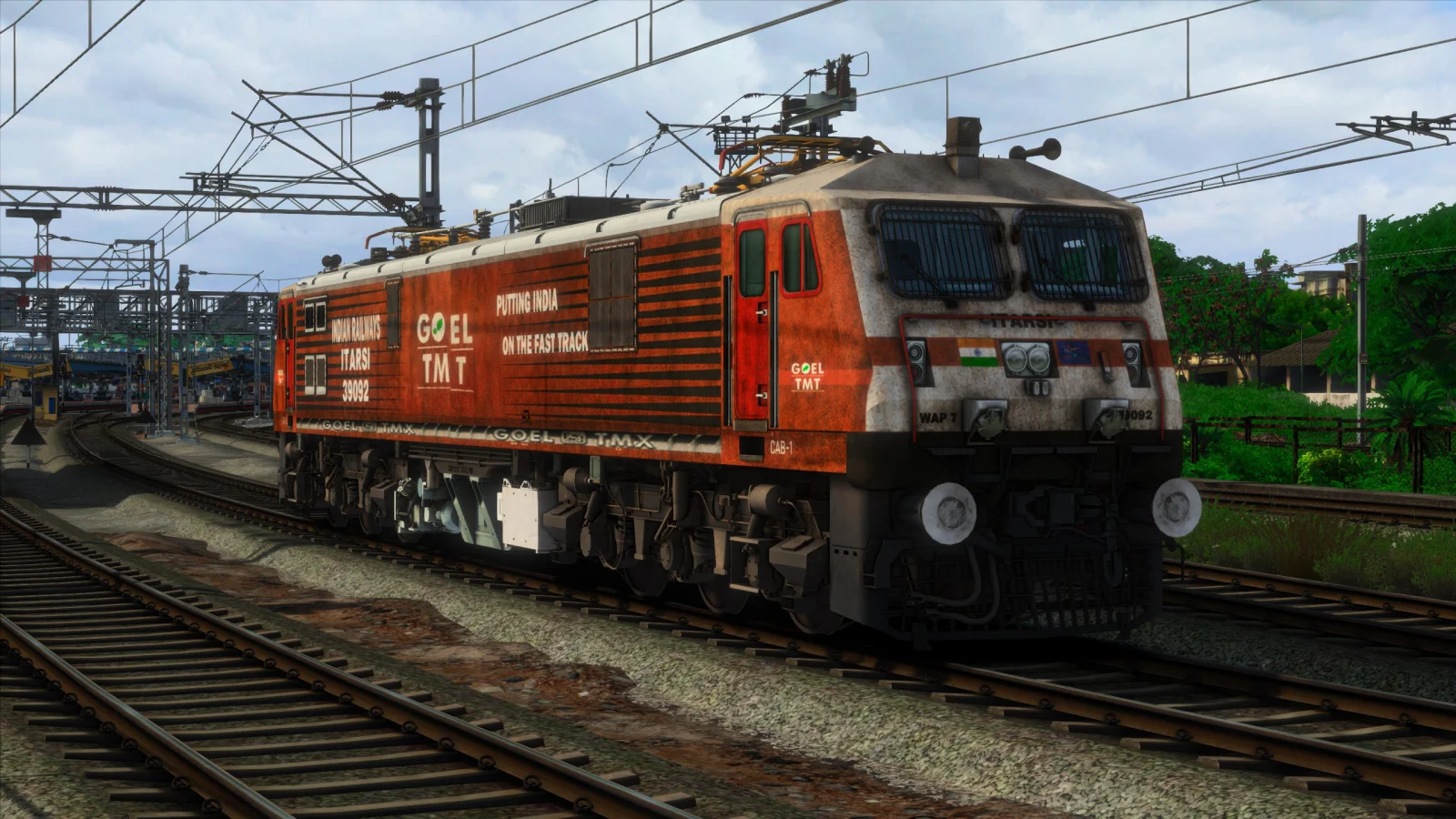
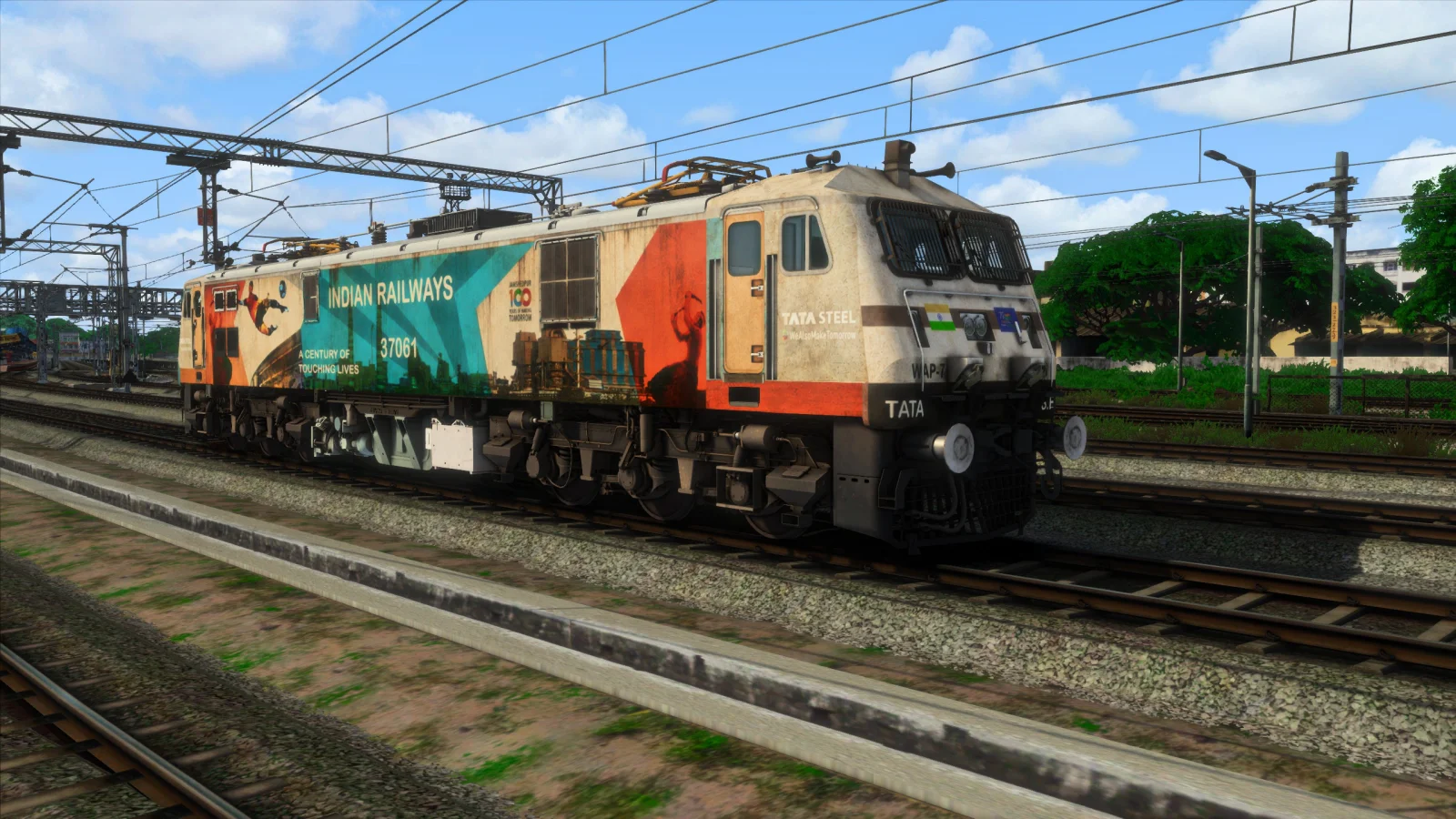
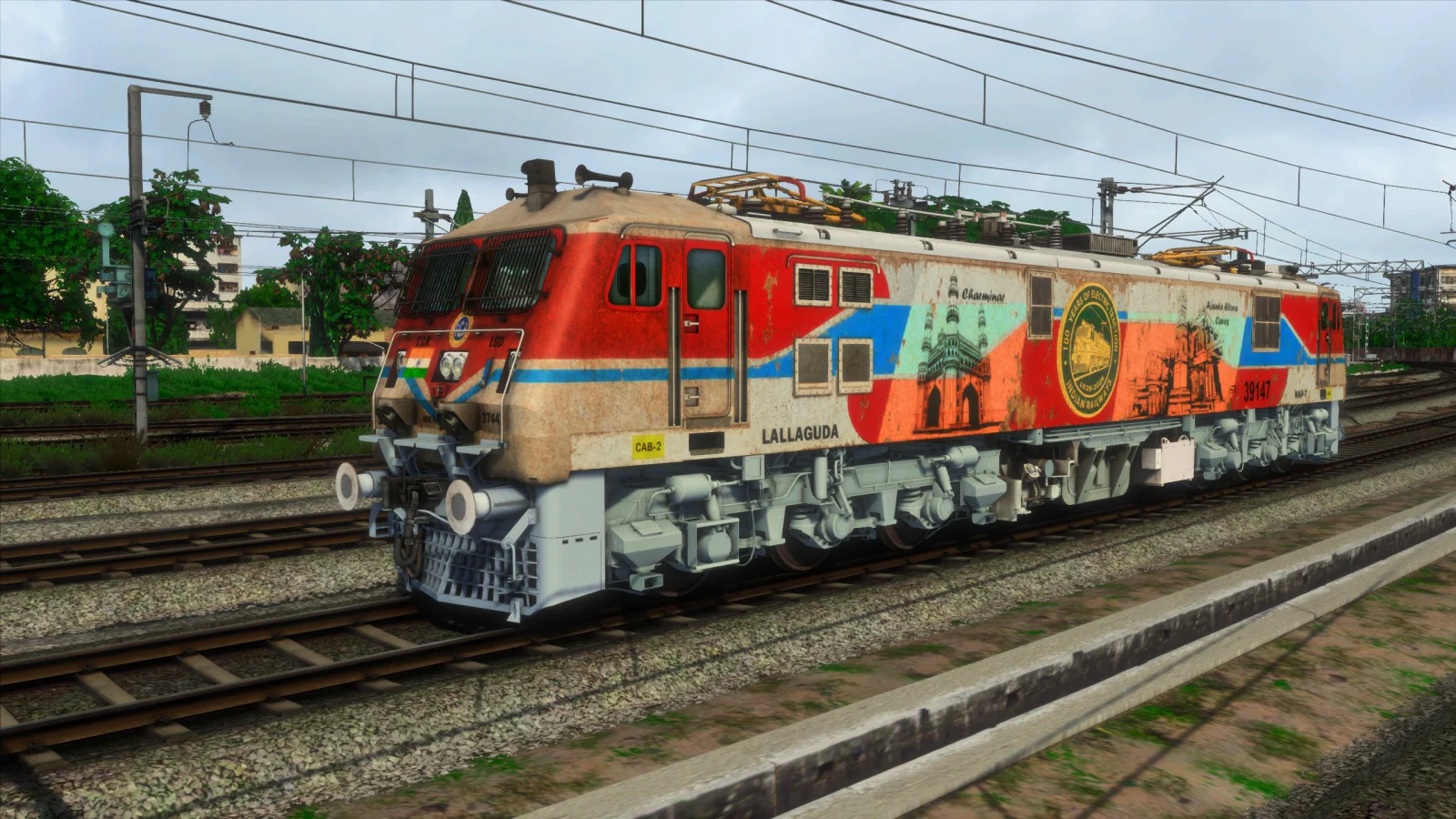
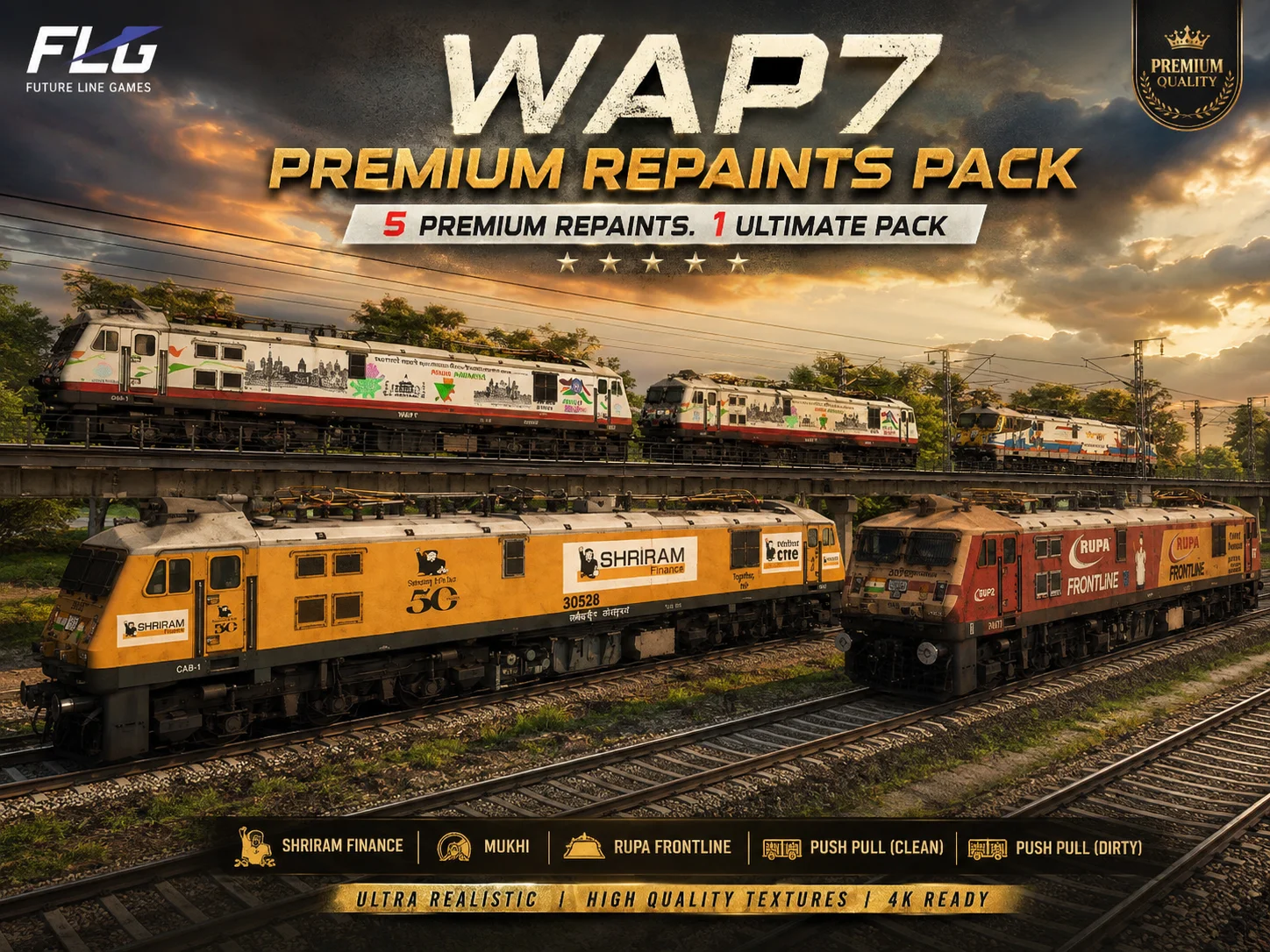
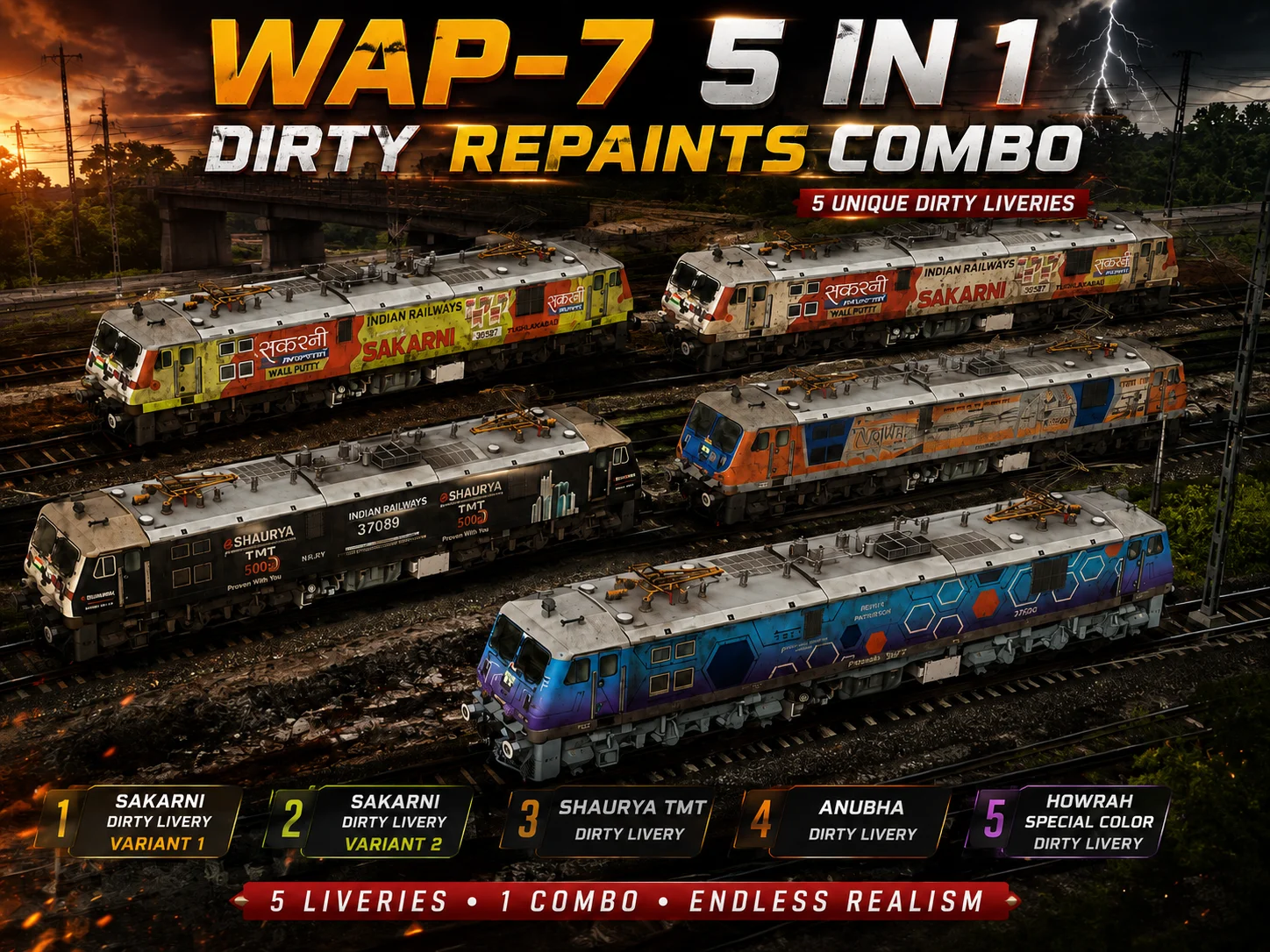
Give your Indian Railways WAP-7 fleet a more realistic and weathered appearance with the WAP-7 5 IN 1 DIRTY Repaints Combo for Train Simulator Classic.
This complete repaint pack includes five different dirty WAP-7 locomotive liveries, featuring two separate Sukarni Dirty variants along with Shaurya TMT, Anubhav and Howrah Special Color dirty liveries.
WHAT'S INCLUDED
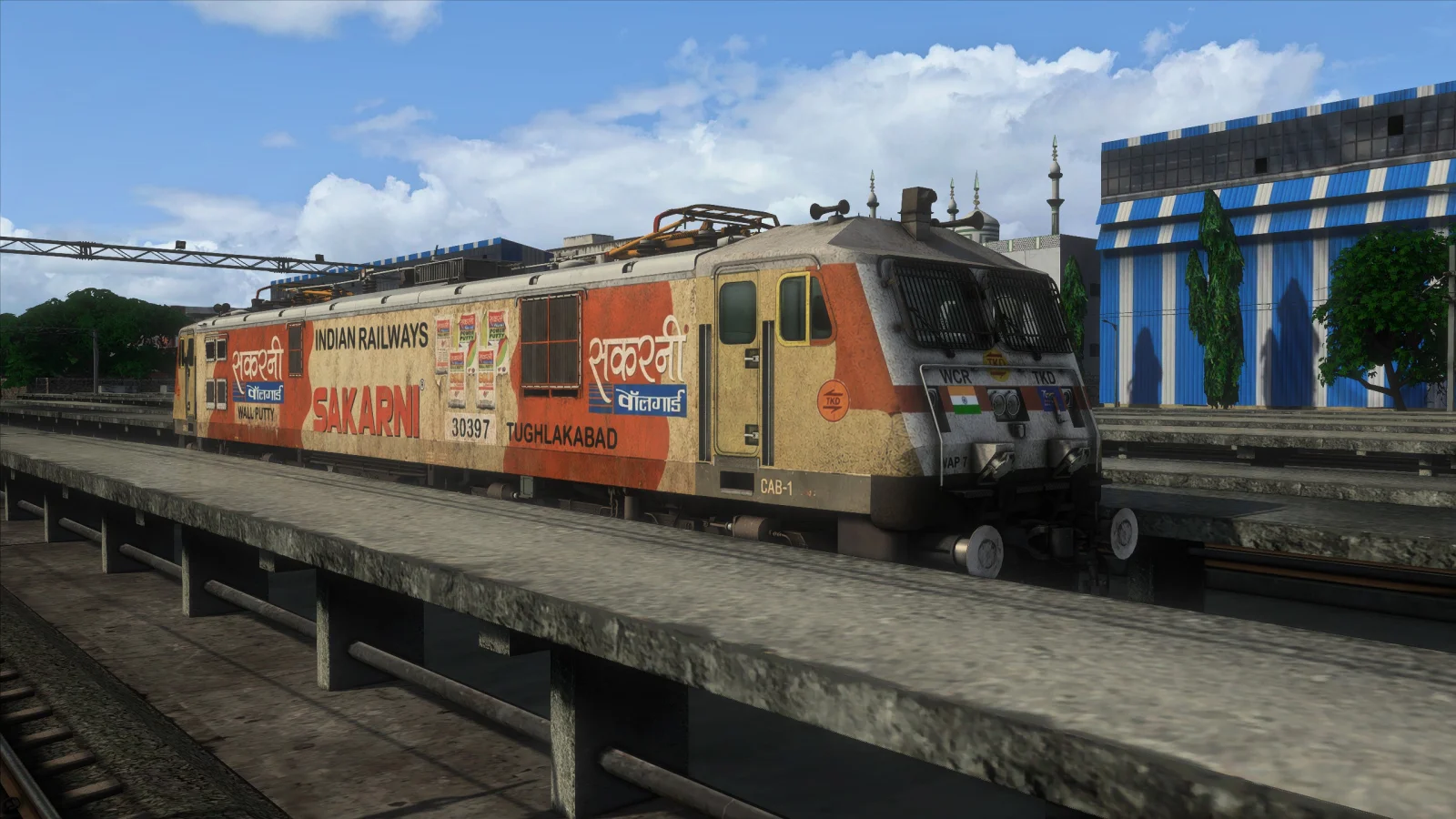
Sukarni Dirty Livery – Variant 1
Sukarni Dirty Livery – Variant 2
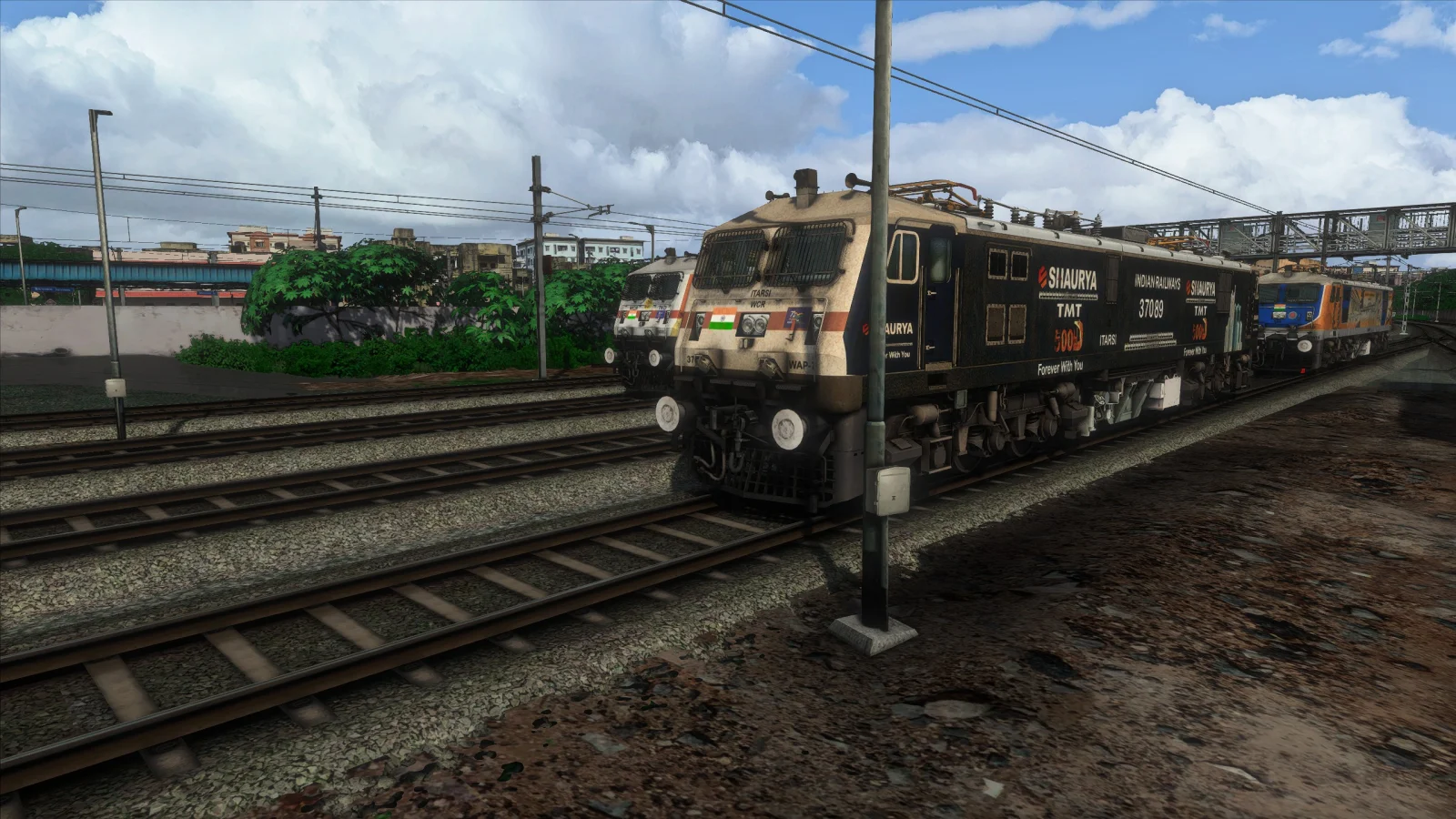
Shaurya TMT Livery – Dirty
Anubhav Livery – Dirty
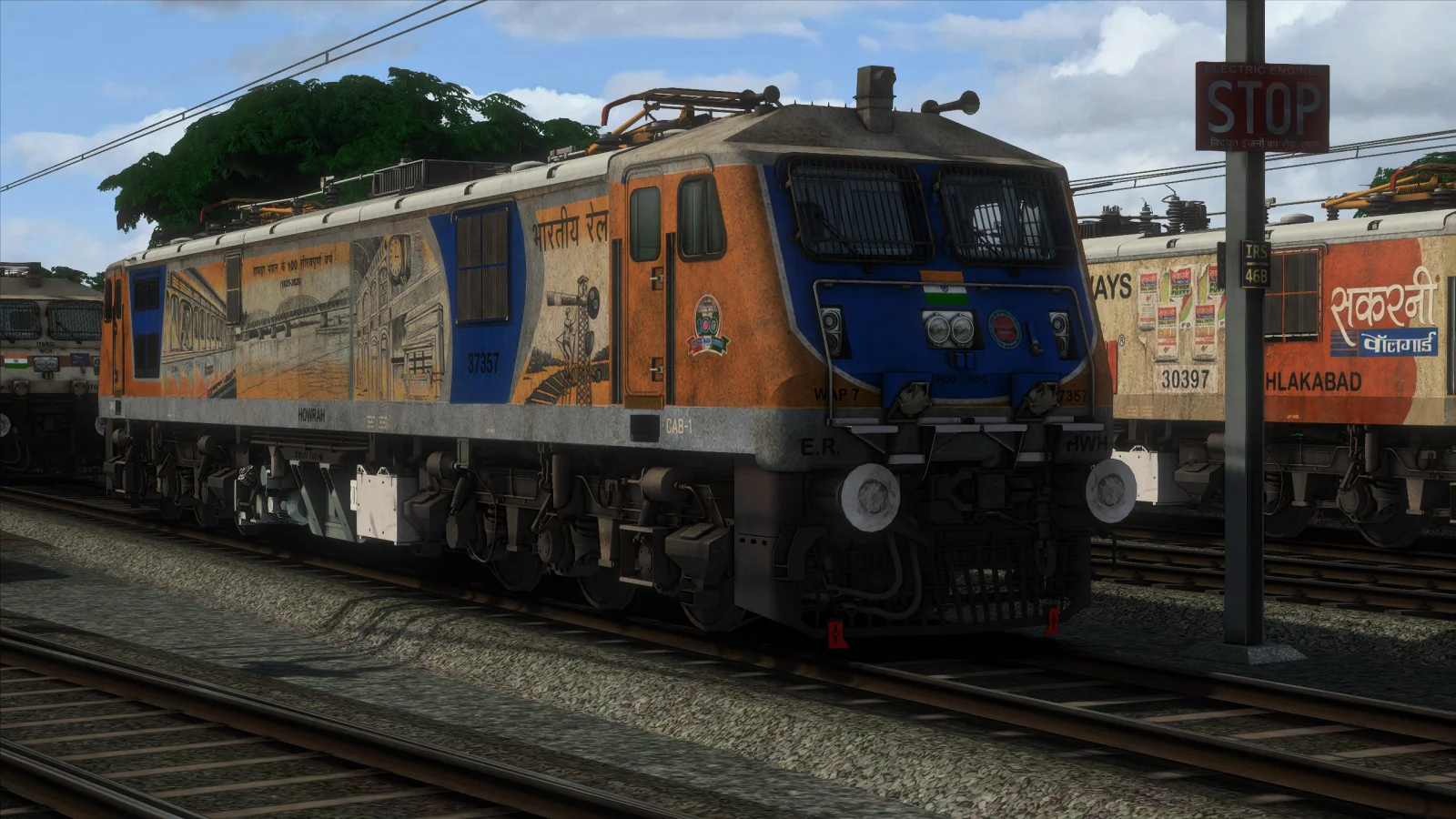
Howrah Special Color Livery – Dirty
Each repaint is designed to give your WAP-7 locomotive a more used, weathered and operational appearance, adding greater visual variety to your Indian railway scenarios.
COMPATIBILITY
This repaint combo is designed for FLG WAP-7 and requires Train Simulator Classic with the required Indian add-ons installed on your system.
The pack is intended for use with the NRV1 route and compatible Indian railway scenarios.
QUICK & HASSLE-FREE INSTALLATION
Purchase the product directly from the SIMADDA website. Once your purchase has been approved, the product will automatically appear in your SA App.
Simply open the SA App and select the product. The complete five-repaint package will automatically install on your system.
There is no need for complicated manual extraction or individual installation of each repaint.
HOW TO APPLY THE REPAINTS
After the installation is complete, close the SA App and launch Train Simulator Classic.
Open the scenario editor and select the WAP-7 locomotive. Choose the repaint you want to use and double-click the locomotive.
On the right-hand side panel, locate the Engine Equipment Number / Consist Number. Depending on the locomotive, the existing number may begin with Q, 5, 1, 2 or another similar value.
Remove the complete existing number and enter:
0
Press Enter.
The selected dirty repaint should now be displayed correctly on the locomotive.
IMPORTANT – SHAURYA TMT DIRTY REPAINT
If you select the Shaurya TMT Dirty repaint and the repaint is not visible on the normal player engine, follow the steps below.
First select the Shaurya TMT AI engine.
Then select/open the normal WAP-7 player engine.
The Shaurya TMT Dirty repaint should now become visible on the normal engine.
Delete the AI engine from the consist if it is no longer required.
Double-click the normal player engine.
On the right-hand side panel, locate the Engine Equipment Number / Consist Number.
Remove the entire existing number. This may be a number beginning with Q, 5, 1, 2 or another value.
Type 0.
Press Enter.
The Shaurya TMT Dirty repaint should now be visible correctly on the normal player WAP-7 engine.
FIVE REPAINTS. ONE COMPLETE PACK.
Instead of installing each repaint separately, this combo gives you all five dirty WAP-7 liveries together through the SA App.
Choose between two different Sukarni Dirty variants, the Shaurya TMT Dirty livery, the Anubhav Dirty livery and the Howrah Special Color Dirty livery to add more variety to your Train Simulator Classic scenarios.
INSTALLATION SUMMARY
Purchase on SIMADDA → Purchase Approved → Product Appears in SA App → Click Product → All 5 Repaints Automatically Installed → Launch Train Simulator Classic → Select Your Repaint.
REQUIREMENTS
You must have Train Simulator Classic, FLG WAP-7, the required Indian add-ons and the NRV1 route installed before using this repaint pack.
This product contains repaints and is intended to be used with the required base locomotive/add-ons.
Give your Indian Railways WAP-7 fleet a more realistic and weathered appearance with the WAP-7 5 IN 1 DIRTY Repaints Combo for Train Simulator Classic.
This complete repaint pack includes five different dirty WAP-7 locomotive liveries, featuring two separate Sukarni Dirty variants along with Shaurya TMT, Anubhav and Howrah Special Color dirty liveries.
WHAT'S INCLUDED
Sukarni Dirty Livery – Variant 1
Sukarni Dirty Livery – Variant 2
Shaurya TMT Livery – Dirty
Anubhav Livery – Dirty
Howrah Special Color Livery – Dirty
Each repaint is designed to give your WAP-7 locomotive a more used, weathered and operational appearance, adding greater visual variety to your Indian railway scenarios.
COMPATIBILITY
This repaint combo is designed for FLG WAP-7 and requires Train Simulator Classic with the required Indian add-ons installed on your system.
The pack is intended for use with the NRV1 route and compatible Indian railway scenarios.
QUICK & HASSLE-FREE INSTALLATION
Purchase the product directly from the SIMADDA website. Once your purchase has been approved, the product will automatically appear in your SA App.
Simply open the SA App and select the product. The complete five-repaint package will automatically install on your system.
There is no need for complicated manual extraction or individual installation of each repaint.
HOW TO APPLY THE REPAINTS
After the installation is complete, close the SA App and launch Train Simulator Classic.
Open the scenario editor and select the WAP-7 locomotive. Choose the repaint you want to use and double-click the locomotive.
On the right-hand side panel, locate the Engine Equipment Number / Consist Number. Depending on the locomotive, the existing number may begin with Q, 5, 1, 2 or another similar value.
Remove the complete existing number and enter:
0
Press Enter.
The selected dirty repaint should now be displayed correctly on the locomotive.
IMPORTANT – SHAURYA TMT DIRTY REPAINT
If you select the Shaurya TMT Dirty repaint and the repaint is not visible on the normal player engine, follow the steps below.
First select the Shaurya TMT AI engine.
Then select/open the normal WAP-7 player engine.
The Shaurya TMT Dirty repaint should now become visible on the normal engine.
Delete the AI engine from the consist if it is no longer required.
Double-click the normal player engine.
On the right-hand side panel, locate the Engine Equipment Number / Consist Number.
Remove the entire existing number. This may be a number beginning with Q, 5, 1, 2 or another value.
Type 0.
Press Enter.
The Shaurya TMT Dirty repaint should now be visible correctly on the normal player WAP-7 engine.
FIVE REPAINTS. ONE COMPLETE PACK.
Instead of installing each repaint separately, this combo gives you all five dirty WAP-7 liveries together through the SA App.
Choose between two different Sukarni Dirty variants, the Shaurya TMT Dirty livery, the Anubhav Dirty livery and the Howrah Special Color Dirty livery to add more variety to your Train Simulator Classic scenarios.
INSTALLATION SUMMARY
Purchase on SIMADDA → Purchase Approved → Product Appears in SA App → Click Product → All 5 Repaints Automatically Installed → Launch Train Simulator Classic → Select Your Repaint.
REQUIREMENTS
You must have Train Simulator Classic, FLG WAP-7, the required Indian add-ons and the NRV1 route installed before using this repaint pack.
This product contains repaints and is intended to be used with the required base locomotive/add-ons.
Key Features
- check_circle 5 unique dirty WAP-7 locomotive repaints
- check_circle Sakarni Dirty Livery – Variant 1
- check_circle Sakarni Dirty Livery – Variant 2
- check_circle Shaurya TMT Livery – Dirty
- check_circle Anubhav Livery – Dirty
- check_circle Howrah Special Color Livery – Dirty
- check_circle Weathered and dirty locomotive appearance
- check_circle Designed for FLG WAP-7
- check_circle Compatible with Train Simulator Classic
- check_circle Requires Train Simulator Classic with Indian add-ons
- check_circle Designed for use with the NRV1 route
- check_circle Automatic installation through the SA App
- check_circle All five repaints installed together
- check_circle No manual file extraction required
- check_circle Simple and hassle-free installation
- check_circle Easy repaint selection through the scenario editor
- check_circle Special instructions included for Shaurya TMT Dirty repaint
- check_circle Adds visual variety to Indian railway scenarios
System Requirements
Train Simulator Classic
FLG WAP-7
Train Simulator Classic with Indian add-ons
NRV1 Beta Route
SA App for automatic installation
Windows PC capable of running Train Simulator Classic
Required base locomotive/add-ons must be installed before using the repaints
FLG WAP-7
Train Simulator Classic with Indian add-ons
NRV1 Beta Route
SA App for automatic installation
Windows PC capable of running Train Simulator Classic
Required base locomotive/add-ons must be installed before using the repaints
Installation Guide
INSTALLATION:
1. Purchase the WAP-7 5 IN 1 DIRTY Repaints COMBO directly from the SIMADDA website.
2. Once your purchase has been approved, the product will automatically appear in your SA App.
3. Open the SA App and select the WAP-7 5 IN 1 DIRTY Repaints COMBO.
4. Click the product to begin installation.
5. The SA App will automatically install all five dirty WAP-7 repaints on your system.
6. No manual extraction or individual installation is required.
7. Once installation is complete, close the SA App.
8. Open Train Simulator Classic and enter the scenario editor.
9. Select the FLG WAP-7 locomotive and choose the repaint you want to use.
10. Double-click the selected locomotive.
11. On the right-hand side panel, locate the Engine Equipment Number / Consist Number. The existing number may start with Q, 5, 1, 2 or another similar value.
12. Remove the complete existing number.
13. Type 0 and press Enter.
14. The selected dirty repaint should now be visible on the locomotive.
SHAURYA TMT DIRTY REPAINT – IMPORTANT:
If the Shaurya TMT Dirty repaint is selected but is not visible on the normal player engine:
1. Select the Shaurya TMT AI engine first.
2. Then open/select the normal WAP-7 player engine.
3. The Shaurya TMT Dirty repaint should now become visible on the normal engine.
4. Delete the Shaurya TMT AI engine from the consist if it is no longer required.
5. Double-click the normal player engine.
6. On the right-hand side panel, locate the Engine Equipment Number / Consist Number.
7. Remove the entire existing number, including numbers beginning with Q, 5, 1, 2 or similar values.
8. Type 0.
9. Press Enter.
10. The Shaurya TMT Dirty repaint should now be visible correctly on the normal player engine.
IMPORTANT:
Make sure FLG WAP-7, Train Simulator Classic with the required Indian add-ons and the NRV1 route are already installed before using this repaint pack.
1. Purchase the WAP-7 5 IN 1 DIRTY Repaints COMBO directly from the SIMADDA website.
2. Once your purchase has been approved, the product will automatically appear in your SA App.
3. Open the SA App and select the WAP-7 5 IN 1 DIRTY Repaints COMBO.
4. Click the product to begin installation.
5. The SA App will automatically install all five dirty WAP-7 repaints on your system.
6. No manual extraction or individual installation is required.
7. Once installation is complete, close the SA App.
8. Open Train Simulator Classic and enter the scenario editor.
9. Select the FLG WAP-7 locomotive and choose the repaint you want to use.
10. Double-click the selected locomotive.
11. On the right-hand side panel, locate the Engine Equipment Number / Consist Number. The existing number may start with Q, 5, 1, 2 or another similar value.
12. Remove the complete existing number.
13. Type 0 and press Enter.
14. The selected dirty repaint should now be visible on the locomotive.
SHAURYA TMT DIRTY REPAINT – IMPORTANT:
If the Shaurya TMT Dirty repaint is selected but is not visible on the normal player engine:
1. Select the Shaurya TMT AI engine first.
2. Then open/select the normal WAP-7 player engine.
3. The Shaurya TMT Dirty repaint should now become visible on the normal engine.
4. Delete the Shaurya TMT AI engine from the consist if it is no longer required.
5. Double-click the normal player engine.
6. On the right-hand side panel, locate the Engine Equipment Number / Consist Number.
7. Remove the entire existing number, including numbers beginning with Q, 5, 1, 2 or similar values.
8. Type 0.
9. Press Enter.
10. The Shaurya TMT Dirty repaint should now be visible correctly on the normal player engine.
IMPORTANT:
Make sure FLG WAP-7, Train Simulator Classic with the required Indian add-ons and the NRV1 route are already installed before using this repaint pack.
Technical Specifications
Primary Platform
Train Simulator Classic
Category
Repaints
Subcategory
Electric Locomotives
Seller
AAJ SE GAMER
Developer Name
ASG
Product SKU
SIM-WAP7-5IN1-DIRTY
Version Release
1.5
System Requirements
Train Simulator Classic
FLG WAP-7
Train Simulator Classic with Indian add-ons
NRV1 Beta Route
SA App for automatic installation
Windows PC capable of running Train Simulator Classic
Required base locomotive/add-ons must be installed before using the repaints
FLG WAP-7
Train Simulator Classic with Indian add-ons
NRV1 Beta Route
SA App for automatic installation
Windows PC capable of running Train Simulator Classic
Required base locomotive/add-ons must be installed before using the repaints
Installation Guide
INSTALLATION:
1. Purchase the WAP-7 5 IN 1 DIRTY Repaints COMBO directly from the SIMADDA website.
2. Once your purchase has been approved, the product will automatically appear in your SA App.
3. Open the SA App and select the WAP-7 5 IN 1 DIRTY Repaints COMBO.
4. Click the product to begin installation.
5. The SA App will automatically install all five dirty WAP-7 repaints on your system.
6. No manual extraction or individual installation is required.
7. Once installation is complete, close the SA App.
8. Open Train Simulator Classic and enter the scenario editor.
9. Select the FLG WAP-7 locomotive and choose the repaint you want to use.
10. Double-click the selected locomotive.
11. On the right-hand side panel, locate the Engine Equipment Number / Consist Number. The existing number may start with Q, 5, 1, 2 or another similar value.
12. Remove the complete existing number.
13. Type 0 and press Enter.
14. The selected dirty repaint should now be visible on the locomotive.
SHAURYA TMT DIRTY REPAINT – IMPORTANT:
If the Shaurya TMT Dirty repaint is selected but is not visible on the normal player engine:
1. Select the Shaurya TMT AI engine first.
2. Then open/select the normal WAP-7 player engine.
3. The Shaurya TMT Dirty repaint should now become visible on the normal engine.
4. Delete the Shaurya TMT AI engine from the consist if it is no longer required.
5. Double-click the normal player engine.
6. On the right-hand side panel, locate the Engine Equipment Number / Consist Number.
7. Remove the entire existing number, including numbers beginning with Q, 5, 1, 2 or similar values.
8. Type 0.
9. Press Enter.
10. The Shaurya TMT Dirty repaint should now be visible correctly on the normal player engine.
IMPORTANT:
Make sure FLG WAP-7, Train Simulator Classic with the required Indian add-ons and the NRV1 route are already installed before using this repaint pack.
1. Purchase the WAP-7 5 IN 1 DIRTY Repaints COMBO directly from the SIMADDA website.
2. Once your purchase has been approved, the product will automatically appear in your SA App.
3. Open the SA App and select the WAP-7 5 IN 1 DIRTY Repaints COMBO.
4. Click the product to begin installation.
5. The SA App will automatically install all five dirty WAP-7 repaints on your system.
6. No manual extraction or individual installation is required.
7. Once installation is complete, close the SA App.
8. Open Train Simulator Classic and enter the scenario editor.
9. Select the FLG WAP-7 locomotive and choose the repaint you want to use.
10. Double-click the selected locomotive.
11. On the right-hand side panel, locate the Engine Equipment Number / Consist Number. The existing number may start with Q, 5, 1, 2 or another similar value.
12. Remove the complete existing number.
13. Type 0 and press Enter.
14. The selected dirty repaint should now be visible on the locomotive.
SHAURYA TMT DIRTY REPAINT – IMPORTANT:
If the Shaurya TMT Dirty repaint is selected but is not visible on the normal player engine:
1. Select the Shaurya TMT AI engine first.
2. Then open/select the normal WAP-7 player engine.
3. The Shaurya TMT Dirty repaint should now become visible on the normal engine.
4. Delete the Shaurya TMT AI engine from the consist if it is no longer required.
5. Double-click the normal player engine.
6. On the right-hand side panel, locate the Engine Equipment Number / Consist Number.
7. Remove the entire existing number, including numbers beginning with Q, 5, 1, 2 or similar values.
8. Type 0.
9. Press Enter.
10. The Shaurya TMT Dirty repaint should now be visible correctly on the normal player engine.
IMPORTANT:
Make sure FLG WAP-7, Train Simulator Classic with the required Indian add-ons and the NRV1 route are already installed before using this repaint pack.
5.0
★★★★★
0 Reviews
Loading reviews…
System Compatibility
check_circle
Train Simulator Classic
Listed platform
Train Simulator Classic
FLG WAP-7
Train Simulator Classic with Indian add-ons
NRV1 Beta Route
SA App for automatic installation
Windows PC capable of running Train Simulator Classic
Required base locomotive/add-ons must be installed before using the repaints
Installation Guide
INSTALLATION:
1. Purchase the WAP-7 5 IN 1 DIRTY Repaints COMBO directly from the SIMADDA website.
2. Once your purchase has been approved, the product will automatically appear in your SA App.
3. Open the SA App and select the WAP-7 5 IN 1 DIRTY Repaints COMBO.
4. Click the product to begin installation.
5. The SA App will automatically install all five dirty WAP-7 repaints on your system.
6. No manual extraction or individual installation is required.
7. Once installation is complete, close the SA App.
8. Open Train Simulator Classic and enter the scenario editor.
9. Select the FLG WAP-7 locomotive and choose the repaint you want to use.
10. Double-click the selected locomotive.
11. On the right-hand side panel, locate the Engine Equipment Number / Consist Number. The existing number may start with Q, 5, 1, 2 or another similar value.
12. Remove the complete existing number.
13. Type 0 and press Enter.
14. The selected dirty repaint should now be visible on the locomotive.
SHAURYA TMT DIRTY REPAINT – IMPORTANT:
If the Shaurya TMT Dirty repaint is selected but is not visible on the normal player engine:
1. Select the Shaurya TMT AI engine first.
2. Then open/select the normal WAP-7 player engine.
3. The Shaurya TMT Dirty repaint should now become visible on the normal engine.
4. Delete the Shaurya TMT AI engine from the consist if it is no longer required.
5. Double-click the normal player engine.
6. On the right-hand side panel, locate the Engine Equipment Number / Consist Number.
7. Remove the entire existing number, including numbers beginning with Q, 5, 1, 2 or similar values.
8. Type 0.
9. Press Enter.
10. The Shaurya TMT Dirty repaint should now be visible correctly on the normal player engine.
IMPORTANT:
Make sure FLG WAP-7, Train Simulator Classic with the required Indian add-ons and the NRV1 route are already installed before using this repaint pack.
1. Purchase the WAP-7 5 IN 1 DIRTY Repaints COMBO directly from the SIMADDA website.
2. Once your purchase has been approved, the product will automatically appear in your SA App.
3. Open the SA App and select the WAP-7 5 IN 1 DIRTY Repaints COMBO.
4. Click the product to begin installation.
5. The SA App will automatically install all five dirty WAP-7 repaints on your system.
6. No manual extraction or individual installation is required.
7. Once installation is complete, close the SA App.
8. Open Train Simulator Classic and enter the scenario editor.
9. Select the FLG WAP-7 locomotive and choose the repaint you want to use.
10. Double-click the selected locomotive.
11. On the right-hand side panel, locate the Engine Equipment Number / Consist Number. The existing number may start with Q, 5, 1, 2 or another similar value.
12. Remove the complete existing number.
13. Type 0 and press Enter.
14. The selected dirty repaint should now be visible on the locomotive.
SHAURYA TMT DIRTY REPAINT – IMPORTANT:
If the Shaurya TMT Dirty repaint is selected but is not visible on the normal player engine:
1. Select the Shaurya TMT AI engine first.
2. Then open/select the normal WAP-7 player engine.
3. The Shaurya TMT Dirty repaint should now become visible on the normal engine.
4. Delete the Shaurya TMT AI engine from the consist if it is no longer required.
5. Double-click the normal player engine.
6. On the right-hand side panel, locate the Engine Equipment Number / Consist Number.
7. Remove the entire existing number, including numbers beginning with Q, 5, 1, 2 or similar values.
8. Type 0.
9. Press Enter.
10. The Shaurya TMT Dirty repaint should now be visible correctly on the normal player engine.
IMPORTANT:
Make sure FLG WAP-7, Train Simulator Classic with the required Indian add-ons and the NRV1 route are already installed before using this repaint pack.
In Stock - Instant Download
FLG WAP 7 - 5 IN 1 Dirty Repaint COMBOS
- reviews
by AAJ SE GAMER
₹200
One license per account
₹250
20% OFF
palette Custom Addon
hd High Definition
file_download Digital Delivery
verified_user Lifetime Updates
lock Secure UPI / QR Payment
Download link delivered within 10 - 30 mins of payment verification